


In today’s competitive technical world, design skills are more important than ever. Whether you are a Mechanical engineer, Civil engineer, Architect, Interior designer, or Diploma student, AutoCAD is one of the most essential software tools you must learn.
If you are searching for the best AutoCAD course in Mohali, then TechCADD Computer Education is one of the most trusted and professional institutes offering industry-level training.
This complete guide will help you understand why AutoCAD is important, what you will learn, career opportunities, and why TechCADD Mohali is the right choice.
What is AutoCAD?
AutoCAD is a Computer-Aided Design (CAD) software developed by Autodesk. It is widely used for 2D drafting and 3D modeling in engineering and architecture industries.
AutoCAD allows professionals to create:
-
Technical drawings
-
Building layouts
-
Machine components
-
Electrical circuits
-
Structural designs
-
Interior layouts
It replaces manual drafting and increases accuracy, speed, and productivity.
Why Learn AutoCAD in 2026?
AutoCAD remains one of the most demanded software tools in 2026 because:
1. High Industry Demand
Companies require skilled CAD designers for manufacturing, construction, and infrastructure projects.
2. Better Job Opportunities
AutoCAD knowledge increases your chances of getting jobs in:
-
Mechanical companies
-
Construction firms
-
Architecture studios
-
Interior design companies
-
MNC engineering firms
3. Freelancing & Project Work
You can also work as a freelance CAD designer and earn per project.
4. Essential for B.Tech & Diploma Students
Mechanical, Civil, and Electrical students must learn AutoCAD to strengthen practical knowledge.
Why Choose TechCADD Mohali for AutoCAD?
TechCADD Computer Education is one of the leading CAD training institutes in Mohali. It is known for practical training, experienced faculty, and placement assistance.
Key Highlights:
✔ Industry-Experienced Trainers
Training is provided by professionals with real industry experience.
✔ Practical Project-Based Learning
Students work on real-world drawings and projects.
✔ Latest Version Training
Learn the latest version of AutoCAD used in industries.
✔ Flexible Timings
Morning, afternoon, and evening batches available.
✔ Certification
Students receive recognized course completion certificates.
✔ Placement Assistance
Guidance for interviews and job opportunities.
AutoCAD Course Modules at TechCADD Mohali
The AutoCAD course is structured from basic to advanced level.
Module 1: Introduction to CAD
-
Basics of CAD
-
AutoCAD interface
-
Workspace setup
Module 2: Basic Drawing Commands
-
Line, Circle, Arc
-
Rectangle, Polygon
-
Polyline
Module 3: Modify Commands
-
Move
-
Copy
-
Rotate
-
Mirror
-
Trim
-
Extend
-
Offset
-
Fillet
Module 4: Layers & Properties
-
Layer management
-
Colors and line types
-
Object properties
Module 5: Dimensioning & Annotation
-
Linear dimensions
-
Angular dimensions
-
Text & Leaders
-
Hatch
Module 6: Blocks & Attributes
-
Creating blocks
-
Dynamic blocks
-
External references
Module 7: Layout & Printing
-
Paper space
-
Viewports
-
Plot settings
Module 8: 3D Modeling (Advanced)
-
3D objects
-
Extrude
-
Revolve
-
3D Modify tools
-
Rendering basics
Who Can Join This Course?
The AutoCAD course at TechCADD Mohali is suitable for:
-
B.Tech Mechanical students
-
B.Tech Civil students
-
Diploma students
-
Architects
-
Interior designers
-
ITI students
-
Job seekers
-
Working professionals
Even beginners can start from scratch.
Career Opportunities After AutoCAD
After completing AutoCAD training, you can apply for:
-
CAD Designer
-
Draftsman
-
Mechanical Design Engineer
-
Civil Draftsman
-
Electrical CAD Designer
-
Interior CAD Designer
Average Salary (India)
-
Freshers: ₹12,000 – ₹20,000 per month
-
Experienced: ₹30,000 – ₹60,000 per month
With experience, salary increases significantly.
Benefits of Learning AutoCAD at TechCADD Mohali
1. Skill-Based Training
Focus on practical skills, not just theory.
2. Interview Preparation
Mock interviews and resume guidance provided.
3. Real-Time Projects
Students practice industrial drawings.
4. Small Batch Size
Better attention and doubt clearing.
5. Affordable Fees
High-quality training at reasonable cost.
Why AutoCAD is Important for Mechanical Students?
Mechanical students use AutoCAD for:
-
Machine part design
-
Assembly drawings
-
Manufacturing drawings
-
Production layouts
It helps students understand real industrial standards.
Why AutoCAD is Important for Civil Students?
Civil engineers use AutoCAD for:
-
Building plans
-
Structural layouts
-
Road designs
-
Plumbing drawings
-
Site plans
Without AutoCAD knowledge, civil engineers struggle in practical fieldwork.
Why AutoCAD is Important for Electrical Students?
Electrical engineers use AutoCAD for:
-
Wiring diagrams
-
Circuit layouts
-
Panel designs
-
Industrial electrical drawings
AutoCAD improves design accuracy and professional presentation.
Course Duration & Certification
-
Duration: 1 to 3 months (depending on batch)
-
Certification: Course Completion Certificate
-
Mode: Offline classroom training
The certificate adds value to your resume.
Practical Learning Approach
At TechCADD Computer Education, students don’t just learn commands — they create real engineering drawings.
Practice includes:
-
Residential building plan
-
Mechanical component drawing
-
Electrical layout
-
Industrial project drawing
This makes students industry-ready.
Placement Support
TechCADD Mohali provides:
-
Resume building help
-
Interview preparation
-
Job references
-
Internship guidance
Many students are placed in local and national companies after completing the course.
Why Mohali is a Good Place for CAD Training?
Mohali is a growing industrial and IT hub. Many construction and manufacturing companies operate nearby, creating job opportunities for skilled CAD designers.
Learning AutoCAD in Mohali gives access to:
-
Local job market
-
Industrial exposure
-
Internship opportunities
Frequently Asked Questions (FAQs)
Is AutoCAD difficult to learn?
No. With proper training and practice, anyone can learn it.
Can beginners join?
Yes, beginners can start from basics.
Is AutoCAD useful for government jobs?
Yes, especially in engineering and drafting-related posts.
Is certification important?
Yes, certification improves your resume strength.
Before CAD software, engineers and designers used manual drafting techniques that were time-consuming and less accurate. AutoCAD revolutionized the design industry by introducing precision, speed, and flexibility.
Today, AutoCAD is used in:
-
Mechanical engineering
-
Civil engineering
-
Architecture
-
Electrical engineering
-
Interior designing
-
Manufacturing industries
-
Construction companies
-
Infrastructure development projects
AutoCAD is considered the foundation software for all technical design professionals.
Why AutoCAD is Still in High Demand in 2026
Even with the rise of advanced 3D software and AI tools, AutoCAD remains highly relevant in 2026.
1. Industry Standard Software
AutoCAD is still widely accepted as a standard drafting tool in engineering and construction industries.
2. Required in Core Engineering Jobs
Most mechanical and civil job interviews require AutoCAD knowledge.
3. Essential for Site Work
Engineers working on construction sites must understand AutoCAD drawings.
4. Foundation for Advanced Software
Learning AutoCAD makes it easier to learn advanced tools like SolidWorks, Revit, CATIA, and 3ds Max.
5. Freelancing Opportunities
Freelance CAD designers earn by designing layouts, floor plans, machine parts, and interior plans.
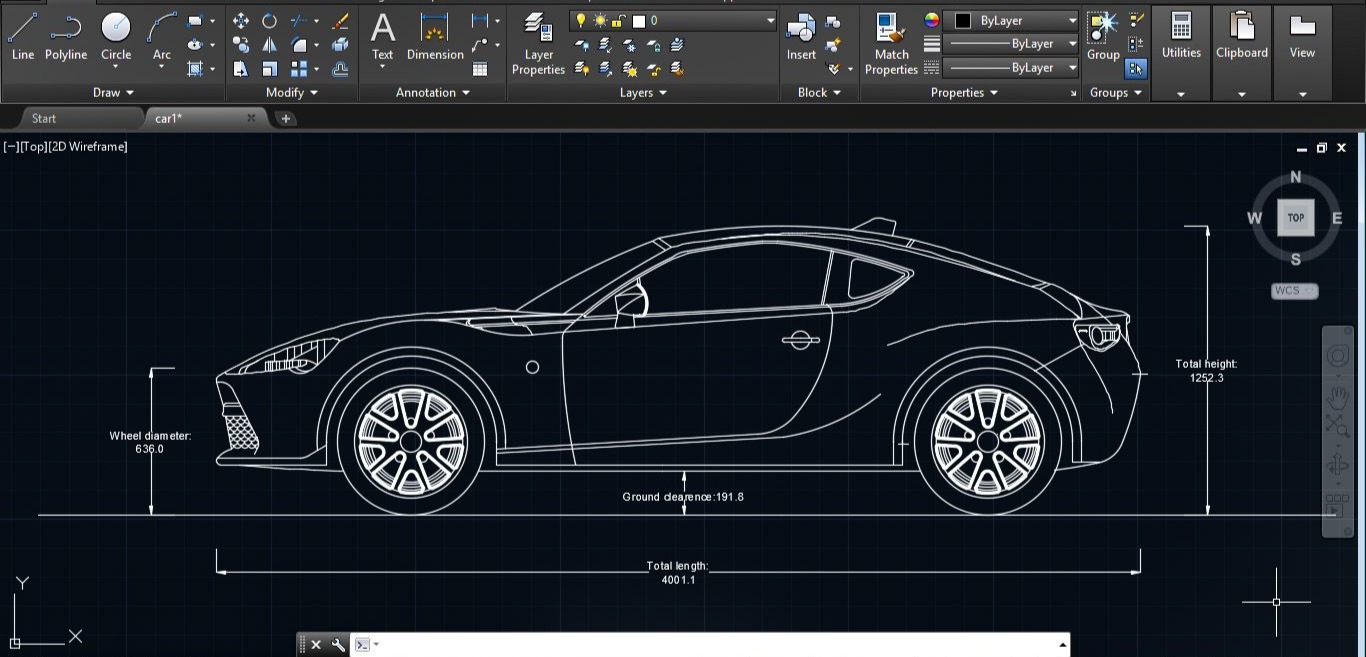
Why Choose TechCADD Mohali for AutoCAD Training?
TechCADD Computer Education is known for its practical and job-oriented training programs.
Key Advantages:
✔ Experienced Trainers
Faculty members have real industrial experience in engineering and design fields.
✔ Industry-Oriented Curriculum
Course syllabus is designed according to current industry requirements.
✔ Practical Project Work
Students create real-world engineering drawings during training.
✔ Small Batch Size
Individual attention ensures better understanding.
✔ Doubt Clearing Sessions
Regular doubt-solving and revision classes.
✔ Certification
Course completion certificate adds value to your resume.
✔ Placement Assistance
Guidance for job interviews and career opportunities.
Detailed Course Curriculum
The AutoCAD course at TechCADD Mohali is divided into beginner to advanced levels.
Module 1: Introduction to CAD & Interface
-
What is CAD?
-
Advantages of CAD over manual drafting
-
AutoCAD interface overview
-
Menu bar, Ribbon, Command line
-
Units setup
-
Grid & Snap settings
-
Drawing limits
Students understand the software environment before starting practical drawing.
Module 2: Basic Drawing Commands
Students learn fundamental commands:
-
Line
-
Circle
-
Arc
-
Rectangle
-
Polygon
-
Ellipse
-
Polyline
-
Spline
Practice exercises help build command confidence.
Module 3: Modify Commands
Modify tools are essential for editing drawings:
-
Move
-
Copy
-
Rotate
-
Mirror
-
Scale
-
Trim
-
Extend
-
Offset
-
Fillet
-
Chamfer
-
Array
Students practice multiple design examples to master these tools.
Module 4: Layers and Properties
Layer management is crucial in professional drawings.
-
Creating layers
-
Assigning colors
-
Line types
-
Line weights
-
Layer properties manager
-
Object properties editing
This module improves drawing organization.
Module 5: Dimensioning & Annotation
Professional drawings require proper measurements.
-
Linear dimension
-
Aligned dimension
-
Angular dimension
-
Radius and Diameter dimension
-
Text styles
-
Leaders
-
Multileaders
-
Hatch and gradient
Students learn industry-standard dimensioning practices.
Module 6: Blocks & Dynamic Blocks
-
Creating blocks
-
Editing blocks
-
Inserting blocks
-
Dynamic blocks
-
Attributes
-
External references (Xref)
Blocks help increase efficiency in large projects.
Module 7: Layout & Printing
-
Model space vs Paper space
-
Viewports
-
Plot setup
-
Page setup manager
-
Scaling for printing
-
Exporting to PDF
Students learn how to prepare drawings for submission and printing.
Module 8: Introduction to 3D Modeling
-
3D workspace
-
Extrude
-
Revolve
-
Sweep
-
Loft
-
3D Rotate
-
3D Orbit
-
Rendering basics
Basic 3D modeling skills enhance job opportunities.
Practical Projects Included
At TechCADD Mohali, students work on real projects such as:
-
Residential building plan
-
2BHK & 3BHK layout design
-
Mechanical shaft drawing
-
Flange design
-
Electrical panel layout
-
Plumbing layout
-
Structural column layout
-
Machine component design
This project-based training ensures industry readiness.
Career Opportunities After AutoCAD
After completing AutoCAD training, students can apply for:
-
CAD Draftsman
-
Mechanical Design Engineer
-
Civil Draftsman
-
Electrical CAD Designer
-
Interior CAD Designer
-
Site Engineer
-
Planning Engineer
-
Project Coordinator
Salary Scope in India
Freshers:
₹12,000 – ₹20,000 per month
2–3 Years Experience:
₹25,000 – ₹40,000 per month
5+ Years Experience:
₹50,000+ per month
Freelancers can earn per project depending on complexity.
AutoCAD for Mechanical Students
Mechanical engineers use AutoCAD for:
-
Machine design drawings
-
Production drawings
-
Assembly drawings
-
Fabrication drawings
-
Tool design
-
Manufacturing layouts
AutoCAD strengthens practical engineering knowledge.
AutoCAD for Civil Students
Civil engineers use AutoCAD for:
-
Building plans
-
Elevation drawings
-
Structural layouts
-
Beam and column drawings
-
Site development plans
-
Road and highway drawings
AutoCAD is essential for site execution and planning.
AutoCAD for Electrical Students
Electrical engineers use AutoCAD for:
-
Wiring diagrams
-
Single-line diagrams
-
Panel design
-
Cable tray layout
-
Industrial electrical drawings
Professional electrical drawings increase job credibility.
Benefits of Learning AutoCAD at TechCADD Mohali
1. Industry-Focused Training
Training is aligned with real industry standards.
2. Portfolio Development
Students build a design portfolio during the course.
3. Confidence Building
Regular assignments improve speed and accuracy.
4. Interview Preparation
Mock interviews and resume guidance provided.
5. Affordable Fee Structure
Quality training at reasonable cost.
Course Duration
-
1 Month (Fast Track)
-
2 Months (Regular Batch)
-
3 Months (Advanced with 3D)
Flexible timings available.
Who Should Join?
-
B.Tech Mechanical Students
-
B.Tech Civil Students
-
Diploma Holders
-
ITI Students
-
Architects
-
Interior Designers
-
Working Professionals
-
Job Seekers
Even beginners with basic computer knowledge can join.
Why Mohali is a Growing Hub for CAD Jobs?
Mohali has growing:
-
Construction companies
-
Infrastructure projects
-
Manufacturing industries
-
Interior design firms
-
Real estate developers
Learning AutoCAD in Mohali increases local job opportunities.
Placement Support at TechCADD Mohali
TechCADD provides:
-
Resume building guidance
-
Interview preparation
-
Company references
-
Internship assistance
-
Career counseling
Many students get placed after completing training.
Frequently Asked Questions (FAQs)
Is AutoCAD difficult?
No. With proper guidance and practice, it becomes easy.
Can I learn without engineering background?
Yes, beginners can start from basics.
Is certificate important?
Yes, certification strengthens your resume.
Does AutoCAD have future scope?
Yes, AutoCAD will remain relevant in core engineering industries.
Final Words
AutoCAD is one of the most powerful and essential design software tools for engineering and architecture students. In 2026, CAD skills are not optional — they are mandatory for technical careers.
If you are looking for the best AutoCAD course in Mohali, then TechCADD Computer Education offers structured training, practical exposure, experienced faculty, and placement assistance.
Invest in your skills today and secure a successful technical career.


Comments
No comments yet. Be the first to comment.
Leave a Comment