


Best AutoCAD Course in Mohali – TechCadd Training Institute
If you are planning to build your career in drafting, architecture, civil engineering, mechanical design, or electrical layout designing, then learning AutoCAD is the first and most important step. TechCadd Mohali provides one of the best AutoCAD training programs designed for beginners, diploma students, B.Tech students, working professionals, and job seekers.
AutoCAD is one of the most powerful and widely used computer-aided design (CAD) software in the world. It is used by engineers, architects, interior designers, mechanical designers, and construction professionals to create accurate 2D drawings and 3D models.
At TechCadd Mohali, we focus on practical learning, real-time projects, and industry-oriented training so that students not only learn software but also understand real-world applications.
What is AutoCAD?


AutoCAD is a computer-aided design (CAD) software developed by Autodesk. It is used for creating precise 2D drawings and 3D models for engineering, architecture, and manufacturing industries.
With AutoCAD, you can create:
-
Floor plans
-
Elevations and sections
-
Mechanical parts
-
Electrical wiring diagrams
-
Structural drawings
-
Interior layouts
-
Industrial components
AutoCAD helps professionals improve accuracy, reduce manual errors, and save time in drafting and design processes.
Why Choose TechCadd Mohali for AutoCAD Course?
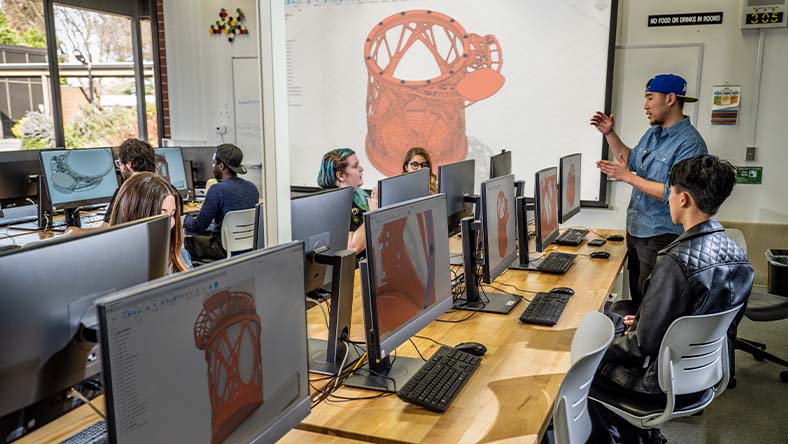

When it comes to professional CAD training, choosing the right institute is very important. TechCadd Mohali stands out because of the following reasons:
1. Industry-Experienced Trainers
Our trainers have practical industry experience in civil, mechanical, and architectural design fields.
2. Practical-Based Training
We focus more on live projects and real-world examples rather than just theory.
3. Updated Curriculum
Our syllabus is updated according to current industry standards.
4. 100% Practical Lab
Every student gets hands-on practice in fully equipped computer labs.
5. Placement Assistance
We provide interview preparation and placement support.
6. Flexible Batches
Morning, afternoon, and evening batches are available for students and working professionals.
AutoCAD Course Syllabus at TechCadd Mohali
Our AutoCAD course is divided into structured modules for better understanding.
Module 1: Introduction to AutoCAD
-
Interface overview
-
Navigation tools
-
Coordinate systems
-
Drawing setup
Module 2: Basic Drawing Tools
-
Line, Circle, Arc
-
Rectangle, Polygon
-
Modify commands
-
Trim, Extend, Offset
Module 3: Advanced Drafting Tools
-
Layers management
-
Blocks and attributes
-
Dimensions and annotations
-
Hatching
Module 4: 2D Drafting Projects
-
Architectural floor plan
-
Mechanical part drawing
-
Electrical layout drawing
Module 5: 3D Modeling
-
3D workspace
-
Solid modeling
-
Surface modeling
-
Rendering basics
Module 6: Printing & Plotting
-
Layout setup
-
Scale settings
-
Exporting drawings
Advanced AutoCAD Training at TechCadd Mohali – Complete Industry Guide
Understanding the Importance of AutoCAD in Modern Engineering
In today’s competitive technical world, industries demand professionals who are skilled in digital drafting and computer-aided design tools. AutoCAD is not just software; it is a standard language of design and drafting used globally. Whether it is building construction, industrial machinery, product manufacturing, or interior planning, AutoCAD plays a crucial role in turning ideas into technical drawings.
TechCadd Mohali understands industry requirements and trains students according to real-time corporate standards. Our focus is not only on software commands but also on practical implementation.
AutoCAD is widely used in:
-
Construction and infrastructure development
-
Smart city projects
-
Highway and bridge design
-
Manufacturing industries
-
Furniture and interior industries
-
Electrical and plumbing layout planning
-
Industrial plant design
As India continues to grow in infrastructure and industrial development, the demand for skilled AutoCAD professionals is rising rapidly.
Detailed Learning Approach at TechCadd Mohali
Unlike traditional institutes that only teach basic commands, TechCadd Mohali follows a structured, practical, and career-oriented approach.
Step 1: Strong Fundamentals
Students first learn:
-
Basic drafting principles
-
Engineering drawing concepts
-
Scale and dimensions
-
Line types and layers
Understanding drafting fundamentals is important before moving to advanced design.
Step 2: Real-World Drawing Practice
Students create:
-
Residential building plans
-
2BHK and 3BHK house plans
-
Elevations and sections
-
Staircase design
-
Column and beam layouts
-
Mechanical part assembly drawings
-
Electrical switchboard layouts
Each drawing is created step-by-step with instructor guidance.
Step 3: Industry-Level Projects
Students work on:
-
Commercial complex layout
-
Factory floor plan
-
Parking design
-
HVAC layout
-
Plumbing and drainage layout
-
Structural detailing
These projects help students gain confidence and practical exposure.
AutoCAD for Civil Engineering Students
Civil engineering students use AutoCAD for:
-
Building plan drafting
-
Site layout planning
-
Structural drawings
-
Foundation detailing
-
Road cross-sections
-
Bridge layouts
At TechCadd Mohali, we teach civil students how to prepare:
-
Working drawings
-
Approval drawings
-
Construction drawings
-
Column schedules
-
Beam detailing
This makes students industry-ready before they complete their degree.
AutoCAD for Mechanical Engineering Students
Mechanical students learn:
-
Machine component drawing
-
Shaft and gear design
-
Bolt and nut detailing
-
Sheet metal drafting
-
Assembly drawings
-
3D part modeling
We teach mechanical drafting standards followed in industries so that students can work in manufacturing companies confidently.
AutoCAD for Electrical Engineering Students
Electrical professionals use AutoCAD for:
-
Wiring diagrams
-
Electrical panel layout
-
Lighting plan
-
Power distribution layout
-
Cable tray layout
TechCadd Mohali provides practical training on electrical drafting used in real projects.
2D Drafting vs 3D Modeling
AutoCAD provides both 2D drafting and basic 3D modeling features.
2D Drafting Includes:
-
Floor plans
-
Sections
-
Elevations
-
Technical part drawings
3D Modeling Includes:
-
3D house model
-
Mechanical parts in 3D
-
Industrial components
-
Furniture modeling
Students learn how to convert 2D drawings into 3D models.
Advanced Commands Covered in Training
Our course includes advanced tools like:
-
Dynamic blocks
-
External references (Xref)
-
Sheet sets
-
Parametric constraints
-
Isometric drawing
-
Rendering basics
-
Plot styles
-
Layout management
These advanced features are required in professional work environments.
Software Version Used in Training
We provide training on the latest stable version of AutoCAD used in industries so that students stay updated with new features and interface improvements.
Portfolio Development Support
TechCadd Mohali helps students create a professional drafting portfolio that includes:
-
5–8 complete projects
-
Floor plan with dimensions
-
3D model screenshots
-
Sectional views
-
Mechanical drawing sheets
A strong portfolio increases interview success rate.
Interview Preparation & Job Guidance
Apart from software training, we also provide:
-
Technical interview questions
-
HR interview preparation
-
Resume building support
-
LinkedIn profile optimization guidance
-
Internship opportunities
This complete support system helps students get jobs faster.
Job Opportunities After AutoCAD Training
After completing the AutoCAD course, students can work as:
-
CAD Draftsman
-
Junior Design Engineer
-
Civil CAD Designer
-
Mechanical CAD Engineer
-
Electrical CAD Draftsman
-
Interior CAD Designer
-
Site Drafting Engineer
Freshers can start earning a good salary, and with experience, growth becomes faster.
Salary Expectations
Entry-level salary may range depending on skills and industry. With 1–2 years of experience, professionals can expect growth in salary and job profile.
Skilled AutoCAD professionals working in metro cities or international projects can earn even higher packages.
Why Mohali Students Prefer TechCadd?
Mohali and Chandigarh are growing technical hubs. Students from:
-
Mohali
-
Chandigarh
-
Kharar
-
Panchkula
-
Zirakpur
prefer TechCadd because of:
-
Practical exposure
-
Affordable fees
-
Experienced faculty
-
Good learning environment
-
Positive student reviews
Benefits of Learning AutoCAD in 2025
Technology is transforming industries rapidly. Companies are adopting digital tools to increase efficiency and reduce manual work.
AutoCAD benefits include:
-
Faster drafting
-
High accuracy
-
Easy modifications
-
Professional presentation
-
Digital storage of drawings
-
Easy sharing of files
Learning AutoCAD ensures job security in engineering and design fields.
Frequently Asked Questions (FAQs)
1. Is AutoCAD difficult to learn?
No, with proper guidance and regular practice, AutoCAD is easy to learn.
2. Can beginners join the course?
Yes, beginners can start without prior experience.
3. Is certificate provided?
Yes, TechCadd Mohali provides certification after course completion.
4. Is placement assistance available?
Yes, placement support is provided.
5. What is course duration?
The duration is approximately 2–3 months depending on batch.
Step-by-Step Learning Outcome
After completing this course, students will be able to:
-
Create professional 2D drawings
-
Prepare complete floor plans
-
Design mechanical parts
-
Draft electrical layouts
-
Create 3D models
-
Print and plot drawings properly
-
Work on real construction drawings
Why Now is the Best Time to Join?
With increasing construction, infrastructure growth, and manufacturing expansion in India, skilled CAD designers are in high demand.
If you are a diploma student, B.Tech student, or job seeker in Mohali or Chandigarh region, this course can significantly improve your career opportunities.
Final Conclusion
AutoCAD is one of the most essential technical skills in civil, mechanical, electrical, and architectural fields. Without CAD knowledge, it is difficult to compete in today’s job market.
TechCadd Mohali offers complete, practical, and industry-oriented AutoCAD training designed to make students job-ready.
If you want to build a strong technical foundation and secure a promising career in drafting and design, enrolling in the AutoCAD course at TechCadd Mohali is the right decision.
Who Can Join This Course?
The AutoCAD course at TechCadd Mohali is suitable for:
-
Civil Engineering Students
-
Mechanical Engineering Students
-
Electrical Engineering Students
-
Architecture Students
-
Interior Designers
-
Diploma Students
-
B.Tech Students
-
Job Seekers
-
Working Professionals
Even if you are a beginner with no technical background, you can start this course easily.
Career Opportunities After AutoCAD Course
After completing AutoCAD training, you can apply for roles such as:
-
CAD Draftsman
-
Civil Draftsman
-
Mechanical Designer
-
Electrical CAD Designer
-
Interior Layout Designer
-
Site Planning Engineer
-
Architectural Draftsman
Industries where AutoCAD professionals are required:
-
Construction Companies
-
Architectural Firms
-
Manufacturing Units
-
Interior Design Companies
-
Government Projects
-
Infrastructure Companies
AutoCAD is a high-demand skill in India and abroad.
Why AutoCAD is Important in 2025?
In today’s digital era, manual drafting is almost outdated. Most industries depend on digital design tools. AutoCAD remains one of the most trusted and powerful CAD software globally.
With infrastructure growth, smart city projects, real estate development, and industrial expansion in India, the demand for skilled CAD designers is increasing rapidly..
If you are a student from Mohali, Chandigarh, or nearby areas, this is the right time to learn AutoCAD and upgrade your skills..
Practical Projects Included in Training
At TechCadd Mohali, students work on real-time projects such as:
-
Residential building floor plan
-
Commercial building layout
-
Mechanical component drawing
-
Electrical panel layout
-
3D house modeling
-
Interior furniture design
These projects help students build a strong portfolio and gain confidence for interviews.
Certification
After successful completion of the AutoCAD course, students receive a professional certificate from TechCadd Mohali. This certificate adds value to your resume and increases job opportunities.
Placement Support
We provide:
-
Resume building support
-
Interview preparation
-
Job references
-
Internship guidance
-
Career counseling
Many of our students are successfully placed in reputed companies.
Course Duration & Mode
-
Duration: 2 to 3 Months
-
Mode: Offline Classroom Training
-
Practical Lab Sessions
-
Small Batch Size
Why Students Prefer TechCadd Mohali?
-
Affordable Fee Structure
-
Practical Exposure
-
Friendly Learning Environment
-
Individual Attention
-
Strong Technical Foundation
TechCadd Mohali is known for quality technical training and student satisfaction.
Final Words
If you want to build a strong career in civil engineering, mechanical design, architecture, or electrical drafting, then AutoCAD is a must-learn software.
TechCadd Mohali provides the best AutoCAD course with practical exposure, industry-oriented training, and placement support.
Enroll today and start your journey toward becoming a professional CAD designer.
Start your journey with TechCadd Mohali and turn your design skills into a professional career.
Enroll today in the best AutoCAD course in Mohali and gain practical, industry-ready training.
Your future in engineering and design begins here — take the first step now.


Comments
No comments yet. Be the first to comment.
Leave a Comment