


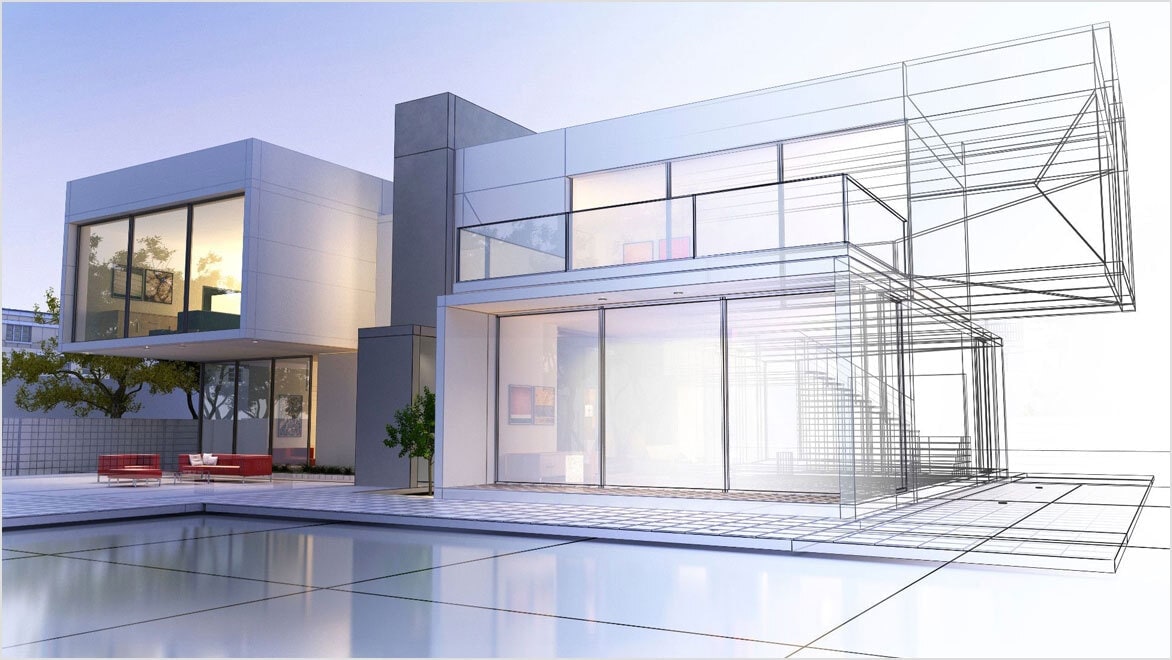
Introduction to AutoCAD Training in Mohali
In today’s competitive engineering and design industry, having strong drafting and design skills is essential. Whether you are a civil engineering student, mechanical diploma holder, architect, interior designer, or working professional, knowledge of AutoCAD can significantly improve your career opportunities.
If you are searching for the best AutoCAD course in Mohali, then TechCadd Mohali is one of the most trusted and reputed training institutes offering professional AutoCAD training in 2026. The course is specially designed according to industry requirements and focuses on practical learning, live projects, and job-oriented skills.
AutoCAD is one of the most widely used design software developed by Autodesk. It is used globally for creating precise 2D drawings and 3D models in civil, mechanical, electrical, architectural, and construction industries.
At TechCadd Mohali, students receive hands-on training in AutoCAD with real-world drawing practice, site layout planning, machine drawing, electrical layouts, and more.
Why Choose AutoCAD as a Career Option?
1. High Demand in Industry
AutoCAD professionals are required in:
-
Construction companies
-
Architecture firms
-
Mechanical manufacturing industries
-
Government departments
-
Infrastructure companies
-
Interior design studios
From road construction projects to factory machinery design, AutoCAD is used everywhere.
2. Suitable for Multiple Streams
AutoCAD is ideal for:
-
Civil Engineers
-
Mechanical Engineers
-
Electrical Engineers
-
Architects
-
Diploma students
-
ITI students
-
Interior designers
3. Excellent Salary Growth
Beginners can earn ₹12,000 – ₹20,000 per month, and experienced AutoCAD designers can earn ₹30,000 – ₹60,000+ per month depending on skills and experience.
 About TechCadd Mohali
TechCadd Computer Institute is one of the leading CAD training institutes in Mohali. The institute provides professional training in:
-
AutoCAD
-
SolidWorks
-
Revit
-
3ds Max
-
STAAD Pro
-
Interior Designing
-
CNC Programming
-
And many other technical courses
The AutoCAD course at TechCadd Mohali is designed to meet current industry standards and government job requirements.
What is AutoCAD?
AutoCAD is a computer-aided design (CAD) software used to create accurate 2D drawings and 3D models.
It is used for:
-
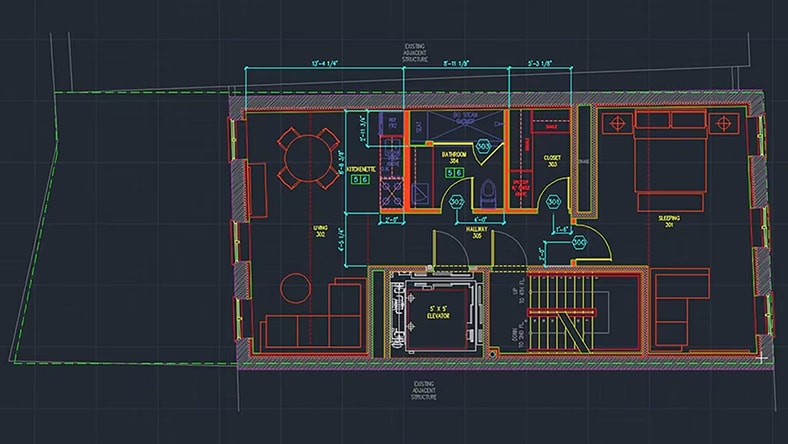
Floor plans
-
Elevations
-
Sections
-
Machine components
-
Electrical diagrams
-
Plumbing layouts
-
Structural drawings
AutoCAD improves productivity, reduces manual errors, and allows easy modification of drawings.
AutoCAD Course Modules at TechCadd Mohali
Module 1: Introduction to CAD
-
Overview of CAD software
-
Installation and interface
-
Coordinate system
-
Units setup
Module 2: Basic Drawing Commands
-
Line
-
Circle
-
Rectangle
-
Arc
-
Polygon
-
Ellipse
Module 3: Modify Commands
-
Trim
-
Extend
-
Offset
-
Mirror
-
Rotate
-
Scale
-
Fillet
-
Chamfer
Module 4: Layers and Properties
-
Layer creation
-
Line types
-
Line weights
-
Object properties
 Module 5: Text and Dimensioning
-
Text styles
-
Dimension styles
-
Leaders
-
Multiline text
Module 6: Blocks and Attributes
-
Creating blocks
-
Inserting blocks
-
Dynamic blocks
Module 7: Layout and Plotting
-
Paper space
-
Model space
-
Viewports
-
Printing and plotting
Module 8: Introduction to 3D Modeling
-
3D workspace
-
3D objects
-
Extrude
-
Revolve
-
Union
-
Subtract
Module 9: Project Work
-
Civil drawing project
-
Mechanical drawing project
-
Electrical layout
-
House plan design
Who Can Join This Course?
-
B.Tech students
-
Polytechnic students
-
ITI students
-
Working professionals
-
Job seekers
-
Site supervisors
No prior experience is required.
Duration of AutoCAD Course
-
Basic AutoCAD: 1.5 to 2 months
-
Advanced AutoCAD with 3D: 3 months
-
Fast-track course available
Classes are available in:
-
Morning batch
-
Evening batch
-
Weekend batch
Practical Training Approach
At TechCadd Mohali, focus is on practical training:
-
70% practical sessions
-
30% theory concepts
-
Real industrial drawings
-
Project-based learning
Students work on real floor plans, machine drawings, and structural layouts.
Placement Assistance
TechCadd Mohali provides:
-
Resume preparation
-
Interview preparation
-
Mock interviews
-
Placement assistance
Students get opportunities in:
-
Construction companies
-
Manufacturing units
-
Design consultancies
-
Government projects
AutoCAD for Government Jobs
AutoCAD knowledge is useful for:
-
PWD departments
-
Municipal corporations
-
CPWD
-
Railways
-
State engineering departments
In states like Himachal Pradesh and Punjab, technical posts require AutoCAD skills for drafting work.
Benefits of Learning AutoCAD at TechCadd Mohali
✔ Experienced trainers
✔ Practical training
✔ Live projects
✔ Flexible timings
✔ Affordable fees
✔ Certification
✔ Placement support
Certification
After completion of the course, students receive:
-
Course completion certificate
-
Project completion certificate
Certification increases job credibility.
 Software Used in Training
Training is provided on latest version of:
AutoCAD
Students also get exposure to related tools like:
-
Revit
-
SolidWorks
-
3ds Max
Career Opportunities After AutoCAD Course
-
CAD Draftsman
-
Design Engineer
-
Site Engineer
-
Mechanical Designer
-
Civil Draftsman
-
Architectural Assistant
-
Interior Designer
Why Mohali is a Good Place for Technical Training?
Mohali is a rapidly growing IT and industrial hub. Many construction and manufacturing companies operate here, creating high demand for skilled AutoCAD professionals.
Students from nearby areas like Chandigarh, Panchkula, and Kharar prefer TechCadd Mohali for CAD training.
Student Support Services
-
Doubt sessions
-
Extra practice lab
-
Backup classes
-
Career counseling
Difference Between AutoCAD and Manual Drafting
| Manual Drafting | AutoCAD |
|---|---|
| Time-consuming | Fast |
| Hard to modify | Easy to edit |
| Risk of error | High accuracy |
| Physical storage | Digital storage |
Real Industry Applications of AutoCAD


-
Residential building design
-
Commercial building layout
-
Bridge structure drawings
-
Machine component design
-
Electrical wiring diagrams
Fees Structure
Fees are affordable and can be paid in installments. Contact TechCadd Mohali for updated fee details.
Why AutoCAD is Important in 2026
Technology is evolving rapidly, and industries now rely heavily on digital design tools. Manual drafting is outdated in most professional environments. AutoCAD enables engineers and designers to create precise 2D drawings and accurate 3D models efficiently.
Key reasons to learn AutoCAD:
-
High demand in construction and manufacturing sectors
-
Required skill for government technical jobs
-
Essential for architects and interior designers
-
Improves productivity and accuracy
-
Opens opportunities in India and abroad
Companies prefer candidates who already have AutoCAD knowledge because it reduces training time and increases work efficiency.
About AutoCAD Software
AutoCAD is a professional computer-aided design software used for:
-
2D Drafting
-
3D Modeling
-
Floor Plan Design
-
Structural Drawings
-
Machine Component Design
-
Electrical Layouts
-
Plumbing Diagrams
AutoCAD allows users to:
-
Create detailed technical drawings
-
Modify designs quickly
-
Maintain drawing standards
-
Print professional layouts
-
Share digital drawings easily
It is widely used in industries such as:
-
Civil Engineering
-
Mechanical Engineering
-
Electrical Engineering
-
Architecture
-
Interior Designing
-
Industrial Manufacturing
Why Choose TechCadd Mohali for AutoCAD?
Mohali has become a growing hub for IT, construction, and industrial development. Due to increasing infrastructure projects in Punjab, Haryana, and Himachal Pradesh, the demand for trained CAD professionals is rising.
TechCadd Mohali stands out because:
✔ Experienced professional trainers
✔ Industry-based practical training
✔ Live project work
✔ Flexible class timings
✔ Affordable fees structure
✔ Placement assistance
✔ Certification after course completion
The institute focuses on practical learning rather than only theoretical knowledge.
Why AutoCAD is Better Than Manual Drafting
| Manual Drafting | AutoCAD |
|---|---|
| Time-consuming | Fast and efficient |
| Difficult to edit | Easy modification |
| High error risk | High accuracy |
| Paper-based | Digital storage |
AutoCAD saves time and improves precision.
Growing Demand in North India
With rapid infrastructure development in Punjab, Haryana, Himachal Pradesh, and Chandigarh region, there is increasing demand for trained AutoCAD professionals.
TechCadd Mohali has become a preferred institute for students from:
-
Chandigarh
-
Panchkula
-
Kharar
-
Zirakpur
-
Ropar
AutoCAD vs Other CAD Software
| Feature | AutoCAD | Other CAD Tools |
|---|---|---|
| Ease of Use | Beginner Friendly | Complex |
| Industry Demand | Very High | Moderate |
| 2D Drafting | Excellent | Varies |
| 3D Modeling | Good | Advanced in some tools |
| Government Job Requirement | Common | Rare |
AutoCAD is considered the foundation for all CAD software learning.
Infrastructure at TechCadd Mohali
-
Modern computer lab
-
Latest version of AutoCAD
-
High-performance systems
-
Individual practice systems
-
Power backup
-
Comfortable classrooms
Students get hands-on access for practice.
Additional Benefits of Joining
✔ Small batch size for personal attention
✔ Individual doubt sessions
✔ Practical assignments
✔ Industrial drawing formats
✔ Flexible fee payment options
✔ Course completion certificate
Salary & Career Growth
AutoCAD professionals can work in:
-
Construction companies
-
Architecture firms
-
Infrastructure companies
-
Manufacturing industries
-
Interior design firms
Salary Expectations
-
Fresher: ₹12,000 – ₹20,000 per month
-
1–3 Years Experience: ₹25,000 – ₹40,000
-
Senior Designer: ₹50,000+
With experience and additional software like Revit or SolidWorks, growth becomes even faster.
Why Mohali is Ideal for CAD Training
Mohali is rapidly developing with:
-
Smart city projects
-
Industrial growth
-
IT parks
-
Real estate expansion
This creates high demand for trained CAD professionals locally.
Students from Chandigarh, Panchkula, Zirakpur, Kharar, and Ropar prefer TechCadd Mohali for quality training.
Step-by-Step Learning Process
-
Introduction to drafting
-
Command mastery
-
Real drawing practice
-
Industry standards
-
3D modeling
-
Project creation
-
Portfolio development
-
Interview preparation
This systematic approach ensures complete skill development.
Long-Term Career Benefits
Learning AutoCAD gives you:
-
Strong design foundation
-
Better understanding of engineering drawings
-
Confidence in site work
-
Ability to work freelance
-
Opportunity to start your own design consultancy
AutoCAD skills never go outdated because drafting is essential in every engineering project.
Complete Industry-Oriented Learning Structure
Unlike basic computer institutes, TechCadd Mohali focuses on practical industry implementation. The course is structured to help students understand not just commands, but real-life application.
Phase 1: Strong Foundation in 2D Drafting
Students first master:
-
Drawing setup and units
-
Coordinate systems
-
Construction lines
-
Object snap settings
-
Grid and snap control
-
Basic drawing tools
You will practice creating:
-
Room layouts
-
Furniture plans
-
Mechanical part outlines
-
Simple structural components
Phase 2: Advanced 2D Professional Drafting
After mastering basics, students move to advanced drafting concepts:
-
Complex geometrical drawing
-
Advanced dimensioning standards
-
Hatching and material representation
-
Layer management for large projects
-
Annotation scaling
-
Title block creation
You will create:
-
Complete house plans
-
Industrial shed layouts
-
Foundation plans
-
Machine component drawings
Phase 3: 3D Modeling & Visualization

3D modeling increases job opportunities significantly. Students learn:
-
3D coordinate system
-
Solid modeling
-
Surface modeling
-
Editing 3D objects
-
Visual styles
-
Basic rendering
Projects include:
-
3D house model
-
3D staircase design
-
3D mechanical bracket
-
3D pipe fitting model
-
Real-Time Project Implementation
Students work on real-world design tasks such as:
Civil Engineering Projects
-
Complete house plan with dimensions
-
Elevation and section
-
Staircase detailing
-
Structural layout
Mechanical Projects
-
Shaft design
-
Gear assembly
-
Coupling drawing
-
Bearing housing
Electrical Projects
-
Electrical wiring layout
-
Lighting plan
-
Panel design
-
Earthing diagram
These projects build confidence and improve portfolio strength.
AutoCAD for Private & Government Jobs
AutoCAD knowledge is beneficial for:
-
Junior Engineer (JE)
-
Draftsman
-
Site Supervisor
-
Design Assistant
-
PWD departments
-
Municipal engineering departments
Government technical posts in Punjab and Himachal often require drafting knowledge.
Industry Applications of AutoCAD
AutoCAD is widely used in:
-
Construction industry
-
Real estate projects
-
Infrastructure development
-
Manufacturing plants
-
Architectural consultancies
-
Interior design studios
From designing a small home to planning a large industrial plant, AutoCAD plays a crucial role.
Course Duration & Batch Options
-
Basic Course: 2 Months
-
Advanced with 3D: 3 Months
-
Fast-track: 1–1.5 Months
Available batches:
-
Morning
-
Afternoon
-
Evening
-
Weekend
Flexible timing benefits students and working professionals.
Placement & Career Support
TechCadd Mohali provides:
-
Resume preparation assistance
-
Mock interviews
-
Technical interview guidance
-
Placement references
Many students get placed in:
-
Construction companies
-
Manufacturing industries
-
Architecture firms
-
Industrial units
Salary & Career Growth
AutoCAD professionals earn:
-
Freshers: ₹12,000 – ₹20,000 per month
-
2–3 Years Experience: ₹25,000 – ₹40,000
-
Senior Designer: ₹50,000+
With additional skills like Revit or SolidWorks, salary can increase further.
Additional Advantages
✔ Strong design foundation
✔ Improves engineering knowledge
✔ Helps in site execution
✔ Enables freelance opportunities
✔ Global job opportunities
Student Support & Facilities
-
Modern computer lab
-
Latest software versions
-
Power backup
-
Practice hours
-
Doubt sessions
-
Backup classes
Students receive continuous academic support.
Why Start Now?
The demand for skilled CAD professionals is increasing every year. Infrastructure development, industrial expansion, and urban growth are creating thousands of opportunities for trained designers.
Learning AutoCAD today means securing your technical future tomorrow.
-
Conclusion
If you are serious about building a career in drafting, design, or engineering, then enrolling in the AutoCAD course at TechCadd Mohali in 2026 is a smart decision. With practical training, experienced faculty, certification, and placement support, you can develop industry-ready skills and secure a good job in the design and construction sector.
AutoCAD is not just software—it is a powerful career tool that opens doors to multiple industries. Start your journey today and become a skilled AutoCAD professional.


Comments
No comments yet. Be the first to comment.
Leave a Comment