



Introduction to AutoCAD Training
AutoCAD is one of the most widely used computer-aided design (CAD) software applications in the world. It is used by engineers, architects, interior designers, mechanical designers, and construction professionals to create accurate technical drawings and designs. Learning AutoCAD has become an essential skill for students and professionals who want to build a successful career in design and engineering fields.
An AutoCAD training institute provides structured learning that helps students understand the software from basic to advanced levels. With proper guidance from experienced trainers, students can learn how to create precise drawings, manage projects, and work on real-world designs.
AutoCAD training is suitable for beginners as well as professionals who want to upgrade their skills. The course focuses on both theoretical knowledge and practical applications so that students can confidently use the software in their professional careers.

What is AutoCAD?
AutoCAD is a computer-aided design software developed for creating 2D drawings and 3D models. It allows users to design buildings, machines, electrical systems, furniture, and many other technical components.
Before AutoCAD, engineers and designers used manual drafting techniques that required a lot of time and effort. With AutoCAD, designs can be created faster, edited easily, and shared digitally with teams and clients.
AutoCAD offers many tools that help designers create accurate and professional drawings. These tools include line, circle, arc, rectangle, trim, extend, dimensioning, layers, blocks, and many more.
Because of its versatility and efficiency, AutoCAD is widely used in industries such as mechanical engineering, civil engineering, architecture, product design, and interior design.
Why Learn AutoCAD?
Learning AutoCAD offers many benefits for students and professionals who want to build a career in design and engineering fields.
1. High Demand in Industry
AutoCAD skills are required in many industries such as construction, manufacturing, architecture, and product design. Companies prefer candidates who have knowledge of design software.
2. Better Career Opportunities
Students with AutoCAD knowledge can work as draftsmen, CAD designers, mechanical designers, civil drafters, and architectural designers.
3. Increased Productivity
AutoCAD allows designers to create drawings quickly and accurately compared to manual drafting.
4. Global Opportunities
AutoCAD is used worldwide, so professionals with AutoCAD skills can work in different countries and industries.
5. Professional Skill Development
Learning AutoCAD improves technical understanding, problem-solving skills, and design thinking.
Who Should Join AutoCAD Training?
AutoCAD training is beneficial for many types of learners and professionals.
Engineering Students
Students from mechanical, civil, electrical, and architecture backgrounds can improve their technical skills by learning AutoCAD.
Diploma Students
Polytechnic students often require AutoCAD knowledge for drafting and design work.
Architects and Interior Designers
AutoCAD helps architects and designers create building plans, layouts, and interior designs.
Working Professionals
Professionals who want to upgrade their skills or switch to design roles can benefit from AutoCAD training.
Job Seekers
Candidates looking for jobs in design or drafting fields can increase their employability by learning AutoCAD.

What You Will Learn in AutoCAD Training
A professional AutoCAD training course covers both fundamental and advanced topics to ensure complete understanding of the software.
Introduction to AutoCAD Interface
Students learn about the AutoCAD workspace, menus, toolbars, command line, and navigation tools.
Basic Drawing Tools
Learners understand how to create basic shapes and drawings using tools such as line, circle, rectangle, polyline, arc, and polygon.
Editing Commands
Editing tools help modify drawings easily. These include trim, extend, offset, move, rotate, mirror, copy, and scale.
Layers and Properties
Layers help organize drawings and manage different elements in a project.
Dimensioning and Annotation
Students learn how to add measurements, notes, and labels to drawings.
Blocks and Symbols
Blocks allow users to create reusable design elements, improving efficiency.
Layouts and Plotting
Learners understand how to prepare drawings for printing and presentation.
3D Modeling Basics
Some courses also introduce basic 3D modeling techniques for creating three-dimensional designs.
Advantages of Learning AutoCAD from a Training Institute
While many online tutorials are available, joining a professional training institute offers several advantages.
Expert Trainers
Institutes provide guidance from experienced instructors who have industry knowledge.
Structured Learning
A well-designed curriculum ensures that students learn concepts step by step.
Practical Training
Students work on real projects and assignments to gain hands-on experience.
Doubt Clearing Sessions
Instructors help students understand difficult concepts and solve technical problems.
Certification
Many institutes provide certificates after course completion, which can help in job applications.
Career Opportunities After AutoCAD Training
After completing AutoCAD training, students can explore many career options in different industries.
CAD Designer
CAD designers create technical drawings using design software.
Mechanical Draftsman
Mechanical draftsmen design machine parts and mechanical systems.
Civil Draftsman
Civil draftsmen prepare construction drawings for buildings, roads, and bridges.
Architectural Draftsman
Architectural draftsmen create building layouts and structural plans.
Interior Design Draftsman
Interior designers use AutoCAD to create furniture layouts and interior plans.
Industrial Designer
Industrial designers use AutoCAD to design products and equipment.
With experience and additional skills, professionals can also move into senior design roles or project management positions.
Importance of Practical Training
Practical training is the most important part of AutoCAD learning. Students should practice regularly and work on real-life projects to improve their skills.
By practicing different types of drawings, students develop a deeper understanding of design concepts and software tools. Practical assignments also help students become confident in handling complex design tasks.
Training institutes often provide project-based learning where students create architectural plans, mechanical components, or interior layouts.
Tips to Become an Expert in AutoCAD
Learning AutoCAD is only the first step. To become an expert designer, students should follow these tips:
Practice regularly and work on different types of drawings.
Learn keyboard shortcuts to improve speed and efficiency.
Understand technical drawing standards used in industries.
Work on real-world projects to gain practical experience.
Keep learning new tools and advanced features of AutoCAD.
Stay updated with the latest design trends and software updates.
Why Choose Our AutoCAD Training Institute
Our AutoCAD training institute focuses on providing high-quality education and practical knowledge to students.
We provide experienced trainers who guide students step by step through the learning process. Our course curriculum is designed according to industry requirements so that students gain relevant skills.
Students receive hands-on training with real projects, which helps them understand how AutoCAD is used in professional environments.
We also provide a supportive learning environment where students can ask questions, solve doubts, and improve their technical knowledge.
Our goal is to help students build confidence, improve their design skills, and prepare them for successful careers in engineering and design industries.

Advanced Features of AutoCAD
After learning the basic tools of AutoCAD, students can move on to advanced features that help create complex and professional designs. These advanced features improve productivity and allow designers to complete projects faster with better accuracy.
Dynamic Blocks
Dynamic blocks allow designers to create flexible blocks that can be modified easily without creating multiple versions. For example, doors, windows, and furniture can be adjusted in size or orientation using dynamic block features.
External References (Xref)
External references help designers work on large projects efficiently. Instead of keeping all drawings in one file, different drawings can be linked together. This feature is very useful for architectural and construction projects where multiple teams work on different parts of a design.
Parametric Design
Parametric design tools help designers control geometry using constraints. This means that when one part of the design changes, related parts automatically adjust. This feature saves time and ensures consistency in complex drawings.
Sheet Sets
Sheet sets help organize multiple drawings within a project. Designers can manage layouts, print drawings, and share project files easily using sheet set tools.
Learning these advanced tools helps students become professional AutoCAD users and improves their chances of getting better job opportunities.
AutoCAD in Different Industries
AutoCAD is not limited to just one field. It is used in many industries where design and technical drawings are required.
Mechanical Engineering
Mechanical engineers use AutoCAD to design machine parts, equipment, tools, and manufacturing components. It helps in creating accurate technical drawings that are used for production.
Civil Engineering
Civil engineers use AutoCAD for creating construction drawings such as road layouts, bridges, drainage systems, and building plans.
Architecture
Architects use AutoCAD to design building layouts, floor plans, elevations, and structural drawings.
Interior Design
Interior designers use AutoCAD to design room layouts, furniture arrangements, lighting plans, and decoration concepts.
Electrical Engineering
Electrical engineers use AutoCAD to create circuit diagrams, wiring layouts, and electrical system plans.
Because AutoCAD is used in many industries, learning this software provides versatile career opportunities.
Importance of CAD Software in Modern Engineering
Computer-Aided Design software has completely changed the way engineers and designers work. Before CAD software, all drawings were created manually using paper, pencils, and drafting tools. This process was slow and difficult to modify.
With CAD software like AutoCAD, designers can easily create, edit, and share drawings digitally. This increases efficiency and reduces errors in design work.
CAD software also allows designers to visualize projects before construction begins. This helps identify problems early and saves both time and money during project development.
Modern industries rely heavily on CAD tools, which makes AutoCAD training an important skill for students entering technical fields.
Skills You Develop During AutoCAD Training
AutoCAD training does not only teach software usage but also helps students develop important professional skills.
Technical Drawing Skills
Students learn how to create accurate technical drawings according to industry standards.
Problem-Solving Skills
Designing complex projects requires logical thinking and problem-solving abilities.
Attention to Detail
Precision is very important in design work. AutoCAD training helps students develop attention to detail.
Time Management
Using AutoCAD tools efficiently allows designers to complete projects faster.
Creativity
AutoCAD allows designers to turn their ideas into digital designs, improving creativity.
These skills are highly valuable in engineering and design careers.
AutoCAD Certification Benefits
Completing an AutoCAD certification course offers several advantages for students and professionals.
Professional Recognition
A certification proves that a candidate has the necessary skills to use AutoCAD professionally.
Better Job Opportunities
Many companies prefer candidates who have AutoCAD certification.
Higher Salary Potential
Professionals with AutoCAD skills often receive better salary packages compared to those without design software knowledge.
Career Growth
AutoCAD certification can help professionals move into higher positions such as senior designer or project engineer.
Future Scope of AutoCAD
The demand for AutoCAD professionals continues to grow as industries expand and technology advances. Infrastructure development, construction projects, and manufacturing industries require skilled designers who can create accurate digital designs.
AutoCAD is also evolving with new features and integration with other advanced design software. Professionals who learn AutoCAD can later expand their knowledge into software such as 3D modeling, building information modeling (BIM), and product design tools.
Because of these opportunities, learning AutoCAD is considered a smart investment for students who want to build a long-term career in technical fields.
Training Methodology
A professional AutoCAD training institute usually follows a structured teaching approach to ensure effective learning.
Classroom Training
Students receive theoretical knowledge and practical demonstrations from experienced trainers.
Practical Exercises
Hands-on exercises help students understand how tools and commands work in real projects.
Assignments and Projects
Students work on projects that simulate real industry scenarios.
Doubt Clearing Sessions
Instructors help students solve problems and clarify difficult topics.
Regular Assessments
Tests and assignments are conducted to evaluate student progress.
This structured training approach helps students learn AutoCAD effectively.
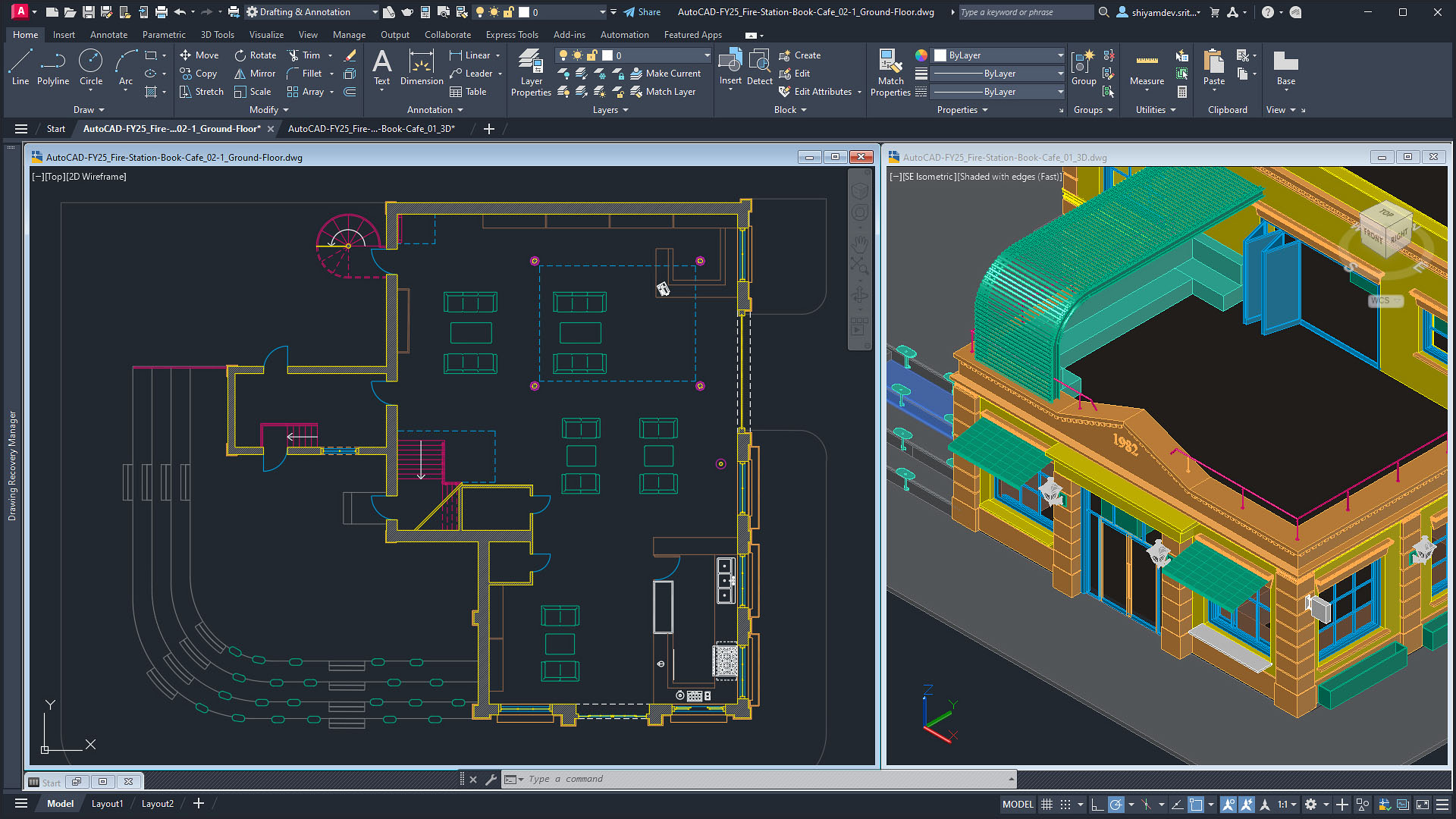
Learning AutoCAD Step by Step
Beginners may feel that AutoCAD is difficult to learn, but with the right training approach it becomes easy.
The first step is understanding the AutoCAD interface and basic commands. Once students become comfortable with drawing tools, they move on to editing tools and design techniques.
After learning 2D drafting, students can explore advanced features and basic 3D modeling. With continuous practice, they gradually develop professional-level skills.
Consistent practice is the key to mastering AutoCAD.
Importance of Practice in AutoCAD
Practice plays a major role in mastering any design software. Students who regularly practice drawing commands and project work become more confident in using AutoCAD.
Practice also improves drawing speed and accuracy. Over time, students learn keyboard shortcuts and efficient techniques that help them complete designs faster.
Many successful designers spend time practicing different types of drawings such as mechanical components, architectural layouts, and electrical diagrams.
Conclusion
AutoCAD is one of the most powerful and widely used design software tools in the world. Learning AutoCAD can open doors to many career opportunities in engineering, architecture, construction, and design industries.
By joining a professional AutoCAD training institute, students can gain practical knowledge, industry skills, and certification that helps them succeed in their careers.
With proper training, dedication, and continuous practice, anyone can become a skilled AutoCAD designer and build a successful future in the design and engineering fields.


Comments
No comments yet. Be the first to comment.
Leave a Comment