


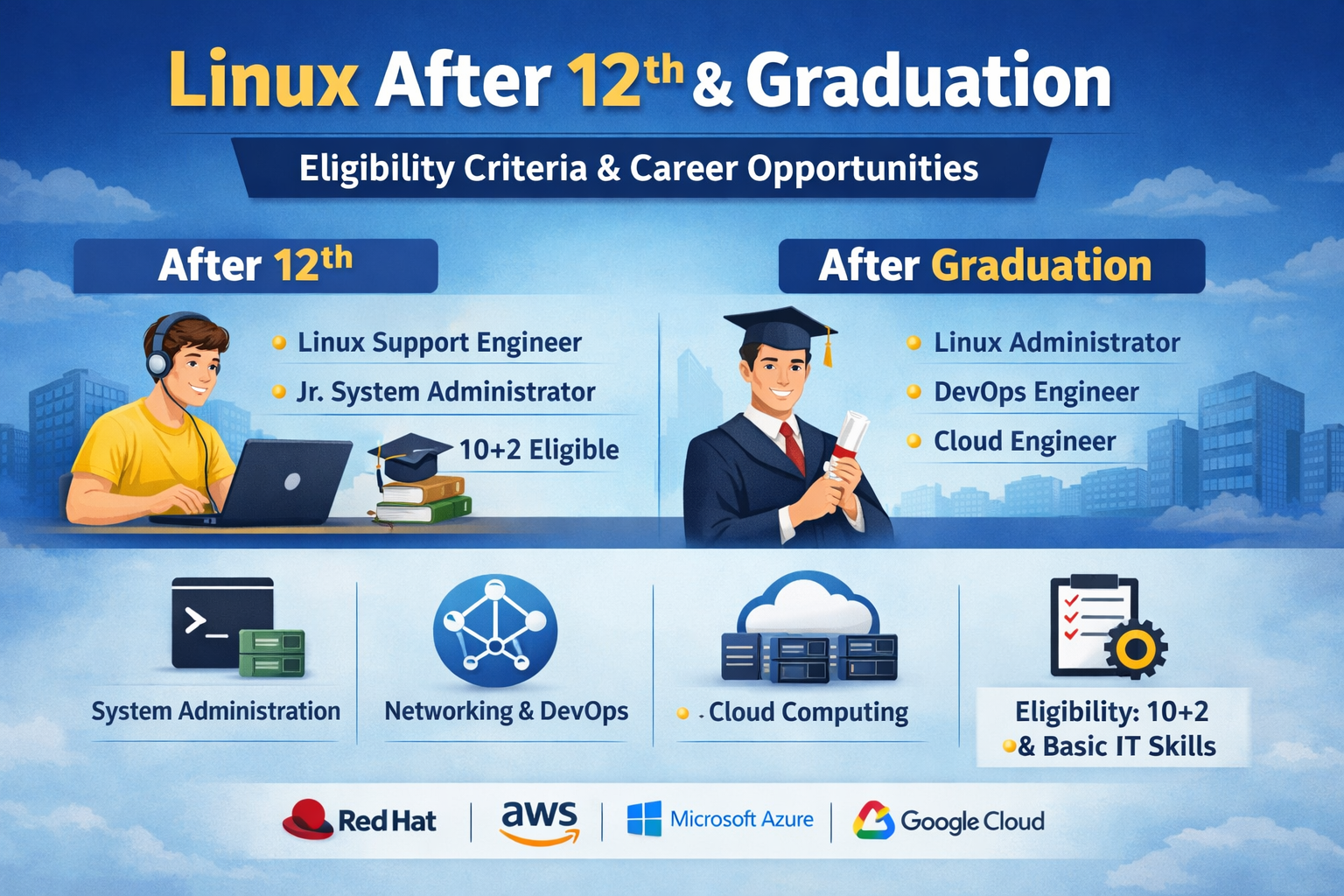
Linux is one of the most powerful and widely used operating systems in the IT industry. From web servers and cloud platforms to cybersecurity systems and supercomputers, Linux plays a critical role in modern technology infrastructure. Whether you are a student who has just completed 12th grade or a graduate looking to build a strong career in IT, learning Linux can open doors to high-demand and high-paying opportunities.
This comprehensive guide explains Linux after 12th, Linux after graduation, Linux eligibility criteria, Linux course eligibility, certifications, career paths, salary scope, and a step-by-step roadmap to start your Linux career.
What is Linux?
Linux is an open-source operating system based on Unix architecture. It is secure, stable, flexible, and highly customizable. Unlike Windows or macOS, Linux is free to use and widely adopted in enterprise environments.
Major companies such as Google, Amazon, Facebook, IBM, and Oracle use Linux-based systems to manage their servers and infrastructure. Most cloud platforms and data centers rely heavily on Linux.
Popular Linux distributions include:
-
Ubuntu
-
CentOS
-
Red Hat Enterprise Linux (RHEL)
-
Debian
-
Kali Linux
Because of its widespread industry usage, Linux skills are in constant demand.
Linux After 12th
Many students believe that IT careers require engineering degrees. However, that is not always true. You can start learning Linux right after completing 12th grade from any stream — Science, Commerce, or Arts.
Can I Learn Linux After 12th?
Yes, absolutely. There are no strict academic restrictions. If you have:
-
Basic computer knowledge
-
Interest in technology
-
Willingness to practice
-
Logical thinking ability
You can start learning Linux immediately after 12th.
Streams Eligible for Linux After 12th
-
Science (PCM / PCB)
-
Commerce
-
Arts
-
Vocational streams
Linux does not require advanced mathematics or programming at the beginner level.
Why Choose Linux After 12th?
Starting early provides several advantages:
-
Early entry into IT industry
-
Strong technical foundation
-
Opportunity to work while pursuing graduation
-
Competitive edge over peers
-
Better internship opportunities
Students can enroll in Linux Administration courses, Networking programs, or certification-based training.
Courses You Can Pursue After 12th
After 12th, you can enroll in:
-
Diploma in Linux Administration
-
Linux + Networking Course
-
Linux + Cloud Computing
-
Linux + Cybersecurity
-
DevOps Foundation Course
Duration may vary from 3 months to 1 year depending on the course level.
Linux After Graduation
Graduates have even better career prospects with Linux skills.
Who Can Learn Linux After Graduation?
Students from the following degrees can pursue Linux:
-
B.A.
-
B.Com.
-
B.Sc.
-
BCA
-
B.Tech
-
B.E.
-
MCA
-
M.Sc (IT/CS)
Even non-technical graduates can learn Linux and switch to an IT career.
Why Learn Linux After Graduation?
Graduates benefit from:
-
Higher starting salaries
-
Faster promotions
-
Access to DevOps and Cloud roles
-
Better corporate job opportunities
-
Eligibility for international IT jobs
Linux combined with graduation creates a strong professional profile.
Linux Eligibility Criteria
One of the biggest advantages of Linux training is its flexible eligibility criteria.
Basic Linux Eligibility Criteria
There are generally no strict requirements. However, the following are preferred:
-
Minimum qualification: 10+2 (Higher Secondary)
-
Basic computer knowledge
-
Understanding of operating systems (optional)
-
Interest in IT
No entrance exam is required for most Linux courses.
Linux Course Eligibility
Eligibility depends on course level:
Beginner Level:
-
10+2 qualification
-
Basic computer skills
Intermediate Level:
-
Knowledge of Linux basics
-
Networking fundamentals (optional)
Advanced Level:
-
Linux administration knowledge
-
Shell scripting basics
-
Server management experience (optional)
Linux Certifications
Certifications increase credibility and job opportunities.
Popular Linux certifications include:
1. RHCSA (Red Hat Certified System Administrator)
Entry-level certification for Linux administrators.
2. RHCE (Red Hat Certified Engineer)
Advanced certification for experienced professionals.
3. CompTIA Linux+
Vendor-neutral Linux certification.
4. LPIC (Linux Professional Institute Certification)
These certifications help secure better job roles and salary packages.
Career Opportunities in Linux
Linux professionals are required in multiple domains.
Entry-Level Jobs
-
Linux Support Engineer
-
Junior System Administrator
-
Technical Support Executive
-
IT Helpdesk
Mid-Level Jobs
-
Linux System Administrator
-
Network Administrator
-
DevOps Engineer
-
Cloud Engineer
Advanced Roles
-
Site Reliability Engineer (SRE)
-
Infrastructure Engineer
-
Cloud Architect
-
Security Analyst
Linux Career Scope in India and Abroad
Linux professionals are in demand globally.
Industries Hiring Linux Professionals:
-
IT companies
-
Cloud service providers
-
Cybersecurity firms
-
Banking and finance
-
Telecom
-
E-commerce
-
Government sectors
Countries with high demand:
-
India
-
USA
-
Canada
-
UK
-
Australia
-
Germany
Salary After Learning Linux
Salary depends on skills, certification, and experience.
After 12th (Entry-Level):
₹15,000 – ₹25,000 per month
After Graduation:
₹3 LPA – ₹6 LPA
With Experience (3–5 Years):
₹6 LPA – ₹12 LPA
Senior-Level:
₹15 LPA and above
Certified professionals earn significantly more.
Skills Required for Linux Career
To build a successful Linux career, you should learn:
-
Linux installation and configuration
-
File system management
-
User and group management
-
Process management
-
Package management
-
Shell scripting
-
Networking basics
-
Server configuration
-
Security fundamentals
Advanced learners can move into:
-
Cloud computing (AWS, Azure)
-
DevOps (Docker, Kubernetes, Jenkins)
-
Automation tools (Ansible, Terraform)
Step-by-Step Roadmap to Start a Successful Linux Career
Building a successful Linux career requires more than just learning basic commands. To compete in today’s IT industry, you need structured learning, deep technical understanding, hands-on practice, certifications, and real-world exposure. Below is a detailed and advanced roadmap that can guide students after 12th or graduation toward becoming professional Linux administrators, DevOps engineers, or cloud specialists.
Step 1: Build a Strong Foundation in Linux Fundamentals
Before moving into advanced topics, you must master core Linux concepts.
1.1 Understand Linux Architecture
-
Kernel and its functions
-
Shell and terminal usage
-
User space vs kernel space
-
Linux distributions (Ubuntu, CentOS, RHEL, Debian)
1.2 Master Command Line Interface (CLI)
You should be comfortable with:
-
File and directory commands (
ls,cd,cp,mv,rm) -
File viewing (
cat,less,tail,head) -
Searching (
grep,find,locate) -
Text processing (
awk,sed) -
Disk management (
df,du,mount) -
Process management (
ps,top,kill,htop)
1.3 File System & Storage Management
-
Linux file system hierarchy (/, /etc, /var, /home, /usr)
-
File permissions and ownership (chmod, chown, chgrp)
-
Access Control Lists (ACL)
-
LVM (Logical Volume Management)
-
Disk partitioning (fdisk, parted)
1.4 User & Group Administration
-
Creating, modifying, deleting users
-
Password policies
-
Sudo privileges
-
PAM (Pluggable Authentication Modules)
👉 Goal: You should be able to install Linux, configure users, manage files, and troubleshoot basic issues independently.
Step 2: Create a Professional Practice Environment
Practical experience is the backbone of Linux expertise.
2.1 Set Up Lab Environment
Instead of using Linux casually, create a structured lab:
-
Install Linux on:
-
Physical machine (dual boot)
-
VirtualBox / VMware
-
Cloud-based virtual servers (AWS Free Tier)
-
2.2 Build Multi-Server Environment
Create:
-
1 Web server
-
1 Database server
-
1 Client system
Simulate real company infrastructure.
2.3 Version Control & Documentation
-
Use Git for tracking scripts
-
Maintain configuration notes
-
Document troubleshooting steps
👉 Goal: Practice enterprise-level scenarios rather than basic desktop usage.
Step 3: Master Networking Concepts for Linux Professionals
Networking knowledge separates beginners from professionals.
3.1 Core Networking Concepts
-
IP Addressing (IPv4 & IPv6)
-
Subnetting basics
-
DNS (Domain Name System)
-
DHCP
-
Gateway and Routing
-
TCP vs UDP
-
Common ports (80, 443, 22, 21, 3306)
3.2 Linux Networking Configuration
-
Configure static IP
-
Network troubleshooting (ping, traceroute, netstat, ss)
-
Firewall configuration (iptables, firewalld)
-
SELinux configuration
3.3 Security Hardening
-
Disable unused services
-
Secure SSH configuration
-
Fail2ban
-
Firewall rules implementation
👉 Goal: You should be able to deploy and secure a Linux server in a networked environment.
Step 4: Advanced Server Administration & Enterprise Skills
This is where you transition from student to professional.
4.1 Web Server Management
-
Apache configuration
-
Nginx configuration
-
Virtual hosts
-
SSL certificate setup (HTTPS)
4.2 Database Server
-
MySQL / MariaDB installation
-
Backup and restore
-
User privileges management
4.3 File & FTP Server
-
NFS configuration
-
Samba server
-
FTP server setup (vsftpd)
4.4 Automation with Shell Scripting
-
Write bash scripts
-
Automate backups
-
Cron jobs
-
Log rotation management
4.5 Performance Monitoring
-
Monitor CPU, memory, disk
-
Analyze logs in /var/log
-
Troubleshoot slow servers
👉 Goal: You should be capable of managing production-level Linux servers.
Step 5: Earn Industry-Recognized Certifications
Certifications validate your skills globally.
Beginner Certification:
-
CompTIA Linux+
Intermediate:
-
RHCSA (Red Hat Certified System Administrator)
Advanced:
-
RHCE (Red Hat Certified Engineer)
Specialized:
-
Kubernetes certifications
-
Cloud certifications (AWS, Azure)
Preparation Strategy:
-
Practice lab scenarios daily
-
Solve real-time case studies
-
Focus on troubleshooting
👉 Goal: Certification increases credibility and salary potential.
Step 6: Gain Real-World Experience (Internships & Freelancing)
Experience is as important as knowledge.
6.1 Apply for:
-
IT support internships
-
System administrator trainee roles
-
NOC engineer positions
6.2 Build Personal Projects
-
Host your own website
-
Deploy a cloud server
-
Create automation scripts
-
Build a monitoring dashboard
6.3 Contribute to Open Source
-
Participate in GitHub projects
-
Report bugs
-
Submit patches
👉 Goal: Build a professional portfolio that proves your capability.
Step 7: Transition to Cloud, DevOps & Automation
Linux is the foundation of modern cloud and DevOps careers.
7.1 Cloud Platforms
Learn:
-
AWS EC2
-
Azure VM
-
Google Cloud
Focus on:
-
Server deployment
-
Load balancing
-
Auto scaling
-
Cloud storage
7.2 DevOps Tools
-
Docker (Containerization)
-
Kubernetes (Container orchestration)
-
Jenkins (CI/CD)
-
GitHub Actions
-
Ansible (Configuration management)
-
Terraform (Infrastructure as Code)
7.3 Infrastructure Automation
-
Automate server deployment
-
Manage infrastructure using code
-
Implement CI/CD pipelines
👉 Goal: Become a DevOps Engineer, Cloud Engineer, or Site Reliability Engineer (SRE).
Advanced Career Path After Linux Mastery
Once you gain 3–5 years of experience, you can move into:
-
Senior Linux Administrator
-
DevOps Engineer
-
Cloud Architect
-
Cybersecurity Engineer
-
Infrastructure Engineer
-
Site Reliability Engineer
Professional Tips for Long-Term Success
✔ Practice daily in a lab environment
✔ Stay updated with new Linux releases
✔ Read official documentation
✔ Join Linux communities
✔ Follow industry blogs
✔ Focus on troubleshooting skills
✔ Build automation mindset
Final Career Strategy
Linux is not just about memorizing commands. It is about:
-
Understanding system architecture
-
Solving real-world infrastructure problems
-
Automating repetitive tasks
-
Securing enterprise systems
-
Managing scalable cloud environments
If you follow this advanced roadmap consistently for 12–18 months with serious dedication, you can transform yourself from a beginner into a highly employable Linux professional.
Linux forms the backbone of cloud computing, DevOps, cybersecurity, and enterprise infrastructure. Mastering it strategically can lead to stable employment, global opportunities, and long-term career growth in the IT industry.
Advantages of Learning Linux
-
Open-source and free
-
High job demand
-
Excellent salary growth
-
Global opportunities
-
Foundation for cloud and DevOps
-
Strong cybersecurity career path
Is Linux a Good Career Choice?
Yes, Linux is a future-proof career option. With increasing digital transformation, cloud adoption, and cybersecurity needs, Linux professionals will remain in demand.
Students who start learning Linux after 12th gain early exposure, while graduates can accelerate career growth with certifications and specialization.
Conclusion
Linux stands as one of the most reliable and future-oriented career choices in the modern IT landscape. It offers flexible eligibility, structured learning pathways, strong career progression, and extensive global demand. Whether you decide to pursue Linux after completing 12th grade or after graduation, the opportunities remain equally promising. The absence of rigid Linux eligibility criteria makes it accessible to students from Science, Commerce, or Arts backgrounds, while Linux course eligibility typically requires only basic computer knowledge, logical thinking ability, and genuine interest in technology.
In today’s digital economy, organizations across industries depend heavily on Linux-based systems to power servers, cloud environments, enterprise applications, cybersecurity frameworks, and mission-critical infrastructure. This widespread adoption ensures long-term job stability and consistent demand for skilled Linux professionals. Students who begin learning Linux early gain a competitive advantage, while graduates can significantly enhance their employability and salary potential by adding Linux certifications and practical experience to their profiles.
If you are seeking a career path that offers job security, structured growth, technical expertise, and international opportunities, Linux is undoubtedly an excellent choice. By starting early, building hands-on experience, earning industry-recognized certifications, and continuously upgrading your skills, you can establish a successful and sustainable IT career.
Ultimately, Linux is far more than just an operating system. It serves as the foundation for advanced domains such as cloud computing, DevOps, automation, cybersecurity, containerization, and enterprise infrastructure management. Mastering Linux not only opens doors to immediate job opportunities but also provides a strong base for long-term professional advancement in the rapidly evolving world of technology.

Comments
No comments yet. Be the first to comment.
Leave a Comment