



ith the increasing demand for skilled design engineers, mechanical software courses have become essential for mechanical engineering students and professionals. These courses focus on practical skills, industry-standard tools, and real-world applications. Understanding the mechanical software course syllabus helps students choose the right training program and prepare for high-paying design jobs.
In this blog, we will explain what you learn in a mechanical design course, along with a detailed mechanical CAD curriculum.
What is a Mechanical Software Course?
A mechanical software course is a job-oriented training program that teaches students how to design, analyze, and document mechanical components using modern CAD, CAE, and CAM software. These courses bridge the gap between academic theory and industry requirements.
Mechanical Software Course Syllabus Overview
A standard mechanical software course syllabus includes the following modules:
1. Engineering Drawing & Drafting Fundamentals
-
Basics of engineering drawing
-
Orthographic and isometric views
-
Dimensioning and tolerances
-
Sectional views
-
GD&T fundamentals
This module strengthens the foundation required for CAD software.
2. AutoCAD for Mechanical Engineers
-
2D drafting tools
-
Layers, blocks, and templates
-
Mechanical symbols and annotations
-
Assembly and part drawings
-
Plotting and standards (ISO, ANSI)
AutoCAD is used for detailed 2D manufacturing drawings.
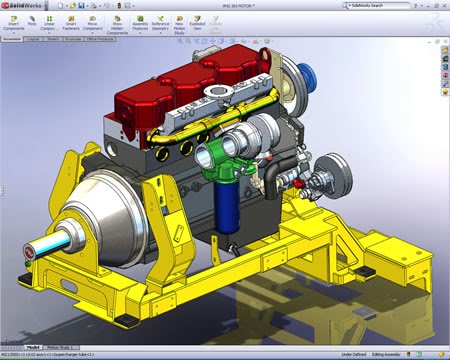
3. 3D Modeling Using SolidWorks / Creo / CATIA
-
Sketching and constraints
-
Part modeling techniques
-
Assembly creation
-
Sheet metal design
-
Weldments and piping basics
-
Surface modeling fundamentals
This module forms the core of the mechanical design course.
4. Mechanical CAD Curriculum (Advanced Topics)
-
Parametric modeling
-
Design intent and modifications
-
Large assembly handling
-
Standard part libraries
-
Design for manufacturing (DFM)
-
Design for assembly (DFA)
These topics improve design efficiency and accuracy.
5. CAE – Analysis & Simulation
-
Introduction to finite element analysis (FEA)
-
Static structural analysis
-
Thermal analysis
-
Modal and vibration analysis
-
Fluid flow basics (CFD introduction)
Software commonly used: ANSYS, Abaqus
6. CAM & Manufacturing Basics
-
CNC machining concepts
-
Tool paths and machining strategies
-
Manufacturing drawings
-
Introduction to CAM software
This helps designers understand real manufacturing processes.
7. Industry Standards & Documentation
-
ISO, ASME, DIN standards
-
Bill of Materials (BOM) creation
-
Tolerance stack-up
-
Quality documentation
This ensures designs meet industry requirements.
What You Learn in a Mechanical Design Course
After completing a mechanical design course, you will be able to:
-
Create 2D and 3D mechanical drawings
-
Design machine components and assemblies
-
Use CAD tools confidently
-
Perform basic analysis and simulations
-
Prepare manufacturing-ready drawings
-
Understand industrial design workflows
These skills make you job-ready for design and production roles.
Who Should Enroll in This Course?
-
Mechanical engineering students
-
Diploma holders
-
Fresh graduates
-
Working professionals
-
Career switchers in engineering
Career Opportunities After Mechanical CAD Training
Mechanical CAD and design skills open doors to roles such as:
-
Mechanical Design Engineer
-
CAD Engineer
-
Product Development Engineer
-
Tool Design Engineer
-
Manufacturing Engineer
Industries include automotive, aerospace, manufacturing, HVAC, and industrial automation.
Why Choose a Job-Oriented Mechanical Software Course?
-
Hands-on practical training
-
Industry-relevant syllabus
-
Live projects and case studies
-
Improved placement opportunities
-
Higher salary potential
Conclusion
A well-structured mechanical software course syllabus equips students with essential design, drafting, and analysis skills. Understanding what you learn in a mechanical design course and following a strong mechanical CAD curriculum helps build a successful and future-proof career in mechanical engineering.

Comments
No comments yet. Be the first to comment.
Leave a Comment