



From Practice to Portfolio: The Power of Mini, Capstone, and Hands-On Coding Projects
If you are currently learning to code, or have been navigating the world of programming for a while, you have likely heard the advice over and over again: "Just build stuff."
It is the most common piece of wisdom dispensed in forums, bootcamps, and university halls. But for many aspiring developers, this advice raises a critical question: What kind of stuff should I build?
Not all coding projects are created equal. There is a distinct difference between the small script you write to automate a boring task and the large-scale application you present to potential employers. To truly progress as a developer, you need to engage with three distinct tiers of project work: Mini Coding Projects, Hands-On Coding Projects, and Capstone Coding Projects.
Each serves a unique purpose in your learning journey. One helps you grasp a syntax, another helps you understand integration, and the final one proves you can deliver a complete product. In this guide, we will break down each category, explore why you need them all, and provide a roadmap for turning practice code into a professional portfolio.
Understanding the Project Pyramid
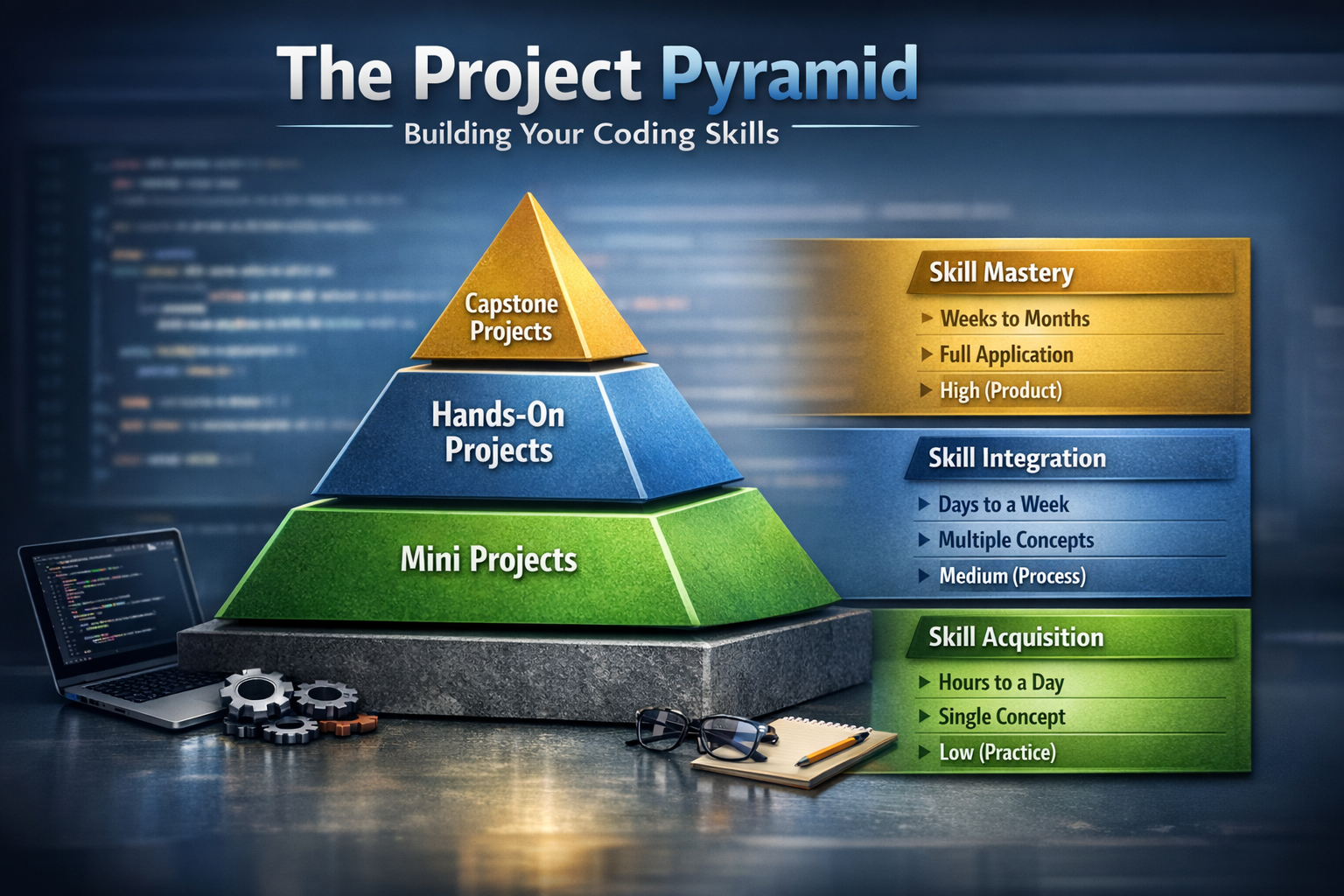
Before diving into the details, let us visualize the hierarchy of coding projects. Think of it as a pyramid where you must build a solid foundation before you can reach the peak.
| Project Type | Primary Goal | Time Investment | Scope | Portfolio Value |
|---|---|---|---|---|
| Mini Projects | Skill Acquisition | Hours to a day | Single Concept | Low (Practice) |
| Hands-On Projects | Skill Integration | Days to a week | Multiple Concepts | Medium (Process) |
| Capstone Projects | Skill Mastery | Weeks to months | Full Application | High (Product) |
Let's explore each level in detail.
Mini Coding Projects – The Building Blocks

Mini coding projects are the smallest unit of practical work. These are quick, focused exercises designed to isolate and test a specific skill or concept. They are the digital equivalent of a musician practicing scales or a basketball player doing free throws. When you first start learning to code, the sheer number of concepts can feel overwhelming. Mini projects cut through the noise by allowing you to focus on one thing at a time.
Characteristics of a Mini Project
-
Focused Scope: They usually address a single problem. "Build a calculator," "Create a to-do list," or "Fetch data from an API and display it." There is no need to worry about user authentication, databases, or deployment.
-
Low Complexity: There is minimal setup. No databases, no user authentication, and often no need for a complex front-end framework. You can write the code in a single file and run it locally.
-
Rapid Feedback: You can start and finish one in a single sitting. This quick feedback loop is crucial for dopamine hits that keep you motivated. Seeing your code work within minutes reinforces your desire to keep learning.
Why You Need Them
-
Syntax Reinforcement: When you learn a new loop, conditional statement, or data structure in Python or JavaScript, a mini-project forces you to type it out, debug it, and make it work. Reading about code is passive; writing code is active. This moves knowledge from your short-term memory to your long-term muscle memory.
-
Fear Reduction: Starting a massive project can be intimidating. Imposter syndrome creeps in, and you might freeze before writing a single line of code. A mini-project has a finish line you can see from the starting line. Completing 10 mini-projects in a week builds immense confidence and proves to yourself that you can indeed code.
-
Experimentation Sandbox: Want to try out that new CSS Grid technique? Want to see if you can implement a sorting algorithm without looking at the solution? A mini-project is the perfect, low-stakes environment to experiment and fail fast. Failure in a mini-project costs you an hour, not a week.
Examples of Mini Coding Projects
-
JavaScript: A random quote generator, a digital clock, a background color flipper, a palindrome checker, a countdown timer.
-
Python: A password generator, a script to rename files in a folder, a text-based adventure game, a web scraper for a single page, a currency converter.
-
Front-End: A tribute page, a landing page clone, an image slider, a responsive navbar, a card component.
Common Mistakes with Mini Projects
Many learners make the mistake of moving through mini-projects too quickly. They build the calculator, check the box, and move on. The key is to modify them. Once you build the calculator, add a new feature. Make it handle percentages. Change the styling. Break it and fix it. This tinkering is where the real learning happens.
The Key Takeaway: Do not skip the mini-projects. They are the foundation upon which everything else is built. If your fundamentals are shaky, your advanced projects will collapse under their own complexity.
Hands-On Coding Projects – Connecting the Dots

Once you have mastered the individual "scales," it is time to play a song. Hands-on coding projects are where you stop learning in isolation and start connecting different technologies together. This is the transition from knowing how to write code to knowing how to build software.
This is the messy, glorious middle ground where you realize that making a button change color is easy, but making that button save data to a database requires a whole new level of thinking. It is here that you truly become a developer.
Characteristics of a Hands-On Project
-
Integration: These projects require you to connect the front-end to the back-end, or an application to a database. For example, building a weather app that uses a public API requires you to handle HTTP requests, parse JSON data, and then manipulate the DOM. You are no longer working in a vacuum.
-
Problem-Solving Under Fire: This is where you encounter the infamous "it works on my machine" problem. You will deal with CORS errors, asynchronous JavaScript callbacks (and promises), and environment variables. These errors are frustrating, but each one teaches you something new about how the web actually works.
-
Tooling Introduction: Hands-on projects force you to use developer tools. You will become best friends with the browser's Inspect Element panel,
console.log(), and Git for version control. You will also start using package managers like npm or pip to install dependencies, which introduces you to the wider ecosystem of open-source code.
Why You Need Them
-
The "Aha!" Moment: Reading about APIs is boring. Struggling to get data from an API, fixing the endpoint, dealing with authentication headers, and then finally seeing it render on your page? That is magic. This is where theory becomes tangible and exciting.
-
Debugging Muscle: You cannot call yourself a developer until you have spent two hours debugging a missing semicolon, a typo in a variable name, or an off-by-one error in a loop. Hands-on projects build your debugging stamina and logic. You learn to think like a detective, following the clues in error messages to find the culprit.
-
Portfolio Building (The Middle Tier): While a calculator is too basic for a portfolio, a well-styled weather app or a movie search engine shows that you understand how the web works. It shows you can handle asynchronous operations, third-party services, and present data to users in a meaningful way. These projects often land you your first internship or junior role.
Examples of Hands-On Coding Projects
-
The API Mashup: Build an app that uses one API to get data (like Spotify) and another to analyze it (like a lyrics API). This forces you to handle multiple data sources and synchronize them.
-
The Full-Stack Todo: A todo list is a mini-project. A todo list with user login, a database (like MongoDB or PostgreSQL), and persistent storage is a hands-on project. Now you are dealing with user sessions, database queries, and CRUD operations.
-
E-Commerce Mini-Site: Create a product listing page with a shopping cart that updates the total price using JavaScript state management. Add a fake checkout process. You will learn about state, props, and user interaction flows.
-
Blog Platform: Build a simple blog where users can view posts, and you (the admin) can create new posts through a separate page. This introduces content management concepts and routing.
The Importance of Version Control
If you are building hands-on projects and not using Git, you are missing a critical part of the learning process. Hands-on projects are the perfect time to learn branching, committing, and merging. Make a mistake? Commit early and often. Want to try a risky feature? Create a branch. These habits will save you in your capstone project and your career.
The Key Takeaway: These projects bridge the gap between "I know syntax" and "I can build things." They are your practice rounds for the big game. Embrace the errors and celebrate the integrations.
Capstone Coding Projects – The Magnum Opus
The term capstone coding projects often conjures images of final university theses or bootcamp graduation requirements. While that is accurate, a capstone project is more than just a grade. It is a declaration to the world (and to yourself) that you are a software developer. It is the project that lands you the job.
A capstone is not about following a tutorial. It is about defining a problem, architecting a solution, and executing it from a blank screen to a deployed application. There is no hand-holding here. You are the architect, the builder, and the quality assurance team.
Characteristics of a Capstone Project
-
Full Lifecycle: You handle everything: ideation, wireframing, database design, back-end logic, front-end UI/UX, testing, and deployment. You experience the entire software development lifecycle, which is invaluable professional experience.
-
User-Centric: It usually serves a real or hypothetical user. It solves a genuine problem, whether it is a budgeting app for freelancers, a study scheduler for students, or a inventory system for a local business. The focus shifts from "what can I build?" to "what should I build to help someone?"
-
Polished Product: The focus shifts from "does it work?" to "does it work well?" This involves performance optimization, responsive design, accessibility (a11y), and security best practices. You want users to enjoy using your app, not just tolerate it.
-
Deployed and Accessible: A capstone project lives on the internet. It has a URL. You can send it to friends, family, and employers. Deployment introduces you to concepts like hosting, domain names, SSL certificates, and environment configuration.
Why You Need Them
-
The Ultimate Interview Tool: In a job interview, when they ask, "Tell me about a challenging project," your capstone is your story. You can talk about the technical hurdles, the design decisions, the trade-offs you had to make, and how you overcame obstacles. It proves you can see a project through to the end and that you have the drive to create something meaningful.
-
Skill Consolidation: A capstone forces you to revisit everything. You might have to go back to basics to optimize a slow SQL query, or dive deep into CSS to fix a layout bug on mobile devices. It solidifies your entire knowledge base and reveals gaps you did not know you had.
-
Demonstrates Independence: It shows that you do not need hand-holding. You can take an idea and run with it. You can research solutions, manage your time, and deliver a finished product. This is the number one trait employers look for in junior developers.
-
Confidence Boost: There is nothing quite like the feeling of launching something you built with your own two hands. Knowing that people anywhere in the world can use something you created is an incredible motivator and confidence booster.
Examples of Capstone Coding Projects
-
A Social Platform for a Niche: A community app for board game enthusiasts where they can review games, find local players, and schedule game nights. Includes user profiles, messaging, and a rating system.
-
A Data Visualization Dashboard: An interactive dashboard that pulls data from a public dataset (like government census data or sports statistics) and visualizes it with charts and graphs. Includes filters, date ranges, and exportable reports.
-
A Task Management System with AI: A project management tool that uses machine learning to predict how long a task will take based on historical data. Integrates with calendars and sends reminders.
-
Freelancer Invoice and Payment Tracker: An app that helps freelancers track hours, generate invoices, and monitor payments. Includes payment gateway integration and financial reporting.
-
Personal Finance Manager: A secure app that connects to bank APIs (via services like Plaid) to categorize spending, set budgets, and provide financial insights.
Planning Your Capstone
Do not jump into coding immediately. Spend at least a week planning. Write user stories. Draw wireframes. Design your database schema. Choose your tech stack deliberately. Good planning prevents massive refactoring later. Remember to build an MVP (Minimum Viable Product) first. Get the core functionality working, then add the bells and whistles. A deployed MVP is worth more than an unfinished masterpiece.
The Key Takeaway: Your capstone is your resume. It is better to have one amazing, deployed capstone project than ten half-finished tutorial projects. It is the proof of your abilities.
The Symbiotic Relationship: How They Work Together
It is crucial to understand that these three types of projects are not mutually exclusive. You should not "finish" mini-projects and then move on forever. The relationship is cyclical and symbiotic.
-
Mini projects are what you do when you are learning a new library or language feature. If you decide to learn React, you start with mini "counter" apps and "button" components before building the full capstone in React. They are your safe space for learning.
-
Hands-on projects are what you do to test new stacks. If you want to try using TypeScript with Node.js, you build a small hands-on project to test the waters before committing to using it in your capstone. They are your proving ground.
-
Capstone projects are what you build when you are ready to commit to an idea. During the capstone, you will likely create numerous mini-projects on the side to test specific functionalities or libraries before implementing them in the main codebase. The capstone drives you back to mini-projects constantly.
From Novice to Pro: A Practical Roadmap
If you are feeling overwhelmed, here is a simple path to follow. This roadmap is designed to take you from absolute beginner to job-ready developer through structured project work.
Phase 1: The Foundation (Weeks 1-4)
Focus exclusively on mini coding projects. Pick a language (Python or JavaScript are great starts). Build 15-20 tiny apps. Get comfortable with the syntax, logic, and basic problem-solving. Do not worry about best practices or architecture yet. Just build.
Phase 2: The Connection (Weeks 5-10)
Pick two hands-on coding projects. Choose one that focuses on front-end interaction (like an API-powered dashboard) and one that focuses on back-end logic (like a user authentication system with a database). Learn how the pieces fit together. Start using Git for every project and push your code to GitHub. Write README files.
Phase 3: The Masterpiece (Weeks 11-16+)
Brainstorm ideas for your capstone coding project. Solve a problem you actually have. Plan it out, build an MVP first, and then iterate. Add features, polish the UI, and finally, deploy it to the internet. Write a detailed case study for your portfolio explaining your process, challenges, and solutions.
Transforming Your Project Descriptions
Once you have built these projects, especially the hands-on and capstone ones, how you present them matters. Here is a quick tip for your blog, resume, or portfolio:
-
Bad Description: "Built a weather app."
-
Good Description: "Developed a hands-on coding project utilizing a third-party weather API to fetch real-time data. Implemented asynchronous JavaScript functions to handle API responses and dynamically update the UI, significantly improving user experience over static data. Managed code versions using Git and deployed the final application via Netlify."
By using specific language and highlighting the challenges you overcame, you turn a simple project into a powerful testament to your skills. Employers do not just want to know what you built; they want to know how you built it and what problems you solved along the way.
Your Portfolio Is Never Finished: Embracing the Cycle
The beauty of coding is that the learning never stops. Today's capstone project is tomorrow's mini-project concept. As technology evolves, you will constantly cycle back through this pyramid.
When you start learning cloud computing (AWS, Azure), you will begin with mini-projects (deploy a static site). You will move to hands-on projects (connect a serverless function to a database). Eventually, you will build a capstone project that leverages the full power of the cloud, perhaps a serverless application that scales automatically.
When you decide to learn a new framework like Vue.js or Svelte, you will build mini-projects to understand components and reactivity. Then you will build hands-on projects integrating with backends. Eventually, you might rewrite your capstone in the new framework to truly master it.
Embrace the cycle. Celebrate the small wins of a mini coding project. Learn from the messy integration of a hands-on coding project. And be proud of the comprehensive solution provided by your capstone coding projects. This is the path from a novice who writes code to a developer who builds solutions that matter.
The Bottom Line: Start Building Today
The difference between someone who wants to be a developer and someone who is a developer is simple: developers build things. They do not just consume tutorials; they create. They struggle through errors, celebrate small victories, and constantly push themselves to build the next thing.
So, open your code editor. Start with a mini-project today. Build that calculator or that random quote generator. Then tomorrow, start connecting pieces with a hands-on project. And in a few months, when you have the skills and confidence, build your capstone. Put it out into the world. Let it represent you.
Your journey from mini to hands-on to capstone is not just about learning to code. It is about learning to think, solve problems, and create value. That is what makes a great developer. Start building today. Your future self will thank you.

Comments
No comments yet. Be the first to comment.
Leave a Comment